Easy to setup, and helps provide an added layer of protection. I added the bold text to my smb.conf, restarted samba...and voila!
[share]
path = /samba/share
read only = No
valid users = @DomainUsers
create mask = 0770
directory mask = 0770
vfs objects = recycle
recycle:repository = .recyclebin/%U
recycle:keeptree = Yes
recycle:touch = Yes
recycle:touch_mtime = Yes
recycle:versions = Yes
recycle:maxsize = 0
recycle:exclude = *.tmp
Tuesday, November 18, 2008

Monday, November 10, 2008
Free Reservationless Conferencing Calls
My Company is doing a trial of www.freeconferencecall.com. They provide free conference services of up to 96 participants per call. There is a full list of features here. Since many of our home office employees have unlimited phone plans (i.e. no long-distance charges), I think this will work well. If we need a toll-free call-in number, the pricing is $0.06/minute/user...still very fair. They even include free recording...on our current service, we pay a flat rate of $15 for any recording (same rate if it is a 2 minutes or 2 hours). Will post again soon with the results of our trial!
Friday, November 7, 2008
Windows Explorer: Show Drive Letters First
This really should be the default setting, I have this changed on all my computers. Even with only a few network drives, I find this much more user friendly. Just a quick registry edit:
http://windowsxp.mvps.org/showdrivelettersfirst.htm
http://windowsxp.mvps.org/showdrivelettersfirst.htm
Thursday, November 6, 2008
Display Warning before login for Windows XP
For a security audit, my company was required to display a warning to all users before they are log on to windows. Here are the items we added to the registry to make it possible:
[HKEY_LOCAL_MACHINE\SOFTWARE\Microsoft\Windows NT\CurrentVersion\Winlogon]
"legalnoticecaption"="Notice"
"legalnoticetext"="Use of this system is limited to authorized individuals. Unauthorized use is strictly prohibited. The administrators of this system reserve the right to monitor its use as necessary to ensure its stability, availability, and security."
Here is a link to the MS Knowlegebase article: http://support.microsoft.com/kb/101063
[HKEY_LOCAL_MACHINE\SOFTWARE\Microsoft\Windows NT\CurrentVersion\Winlogon]
"legalnoticecaption"="Notice"
"legalnoticetext"="Use of this system is limited to authorized individuals. Unauthorized use is strictly prohibited. The administrators of this system reserve the right to monitor its use as necessary to ensure its stability, availability, and security."
Here is a link to the MS Knowlegebase article: http://support.microsoft.com/kb/101063
Wednesday, November 5, 2008
Samba Printer Setup
Finally added our office printers to our samba server. This guide was very helpful:
http://www.linuxtopia.org/online_books/network_administration_guides/samba_reference_guide/29_CUPS-printing_105.html
My one problem was when adding the drivers. I kept receiving the error message: "WERR_ACCESS_DENIED". In the process of looking at many configurations and setup guides, I had set my smb.conf incorrectly. After lots of digging, I found that I had incorrectly set this parameter: "use client driver = yes". In my scenario, it should be "use client driver = no".
http://www.linuxtopia.org/online_books/network_administration_guides/samba_reference_guide/29_CUPS-printing_105.html
My one problem was when adding the drivers. I kept receiving the error message: "WERR_ACCESS_DENIED". In the process of looking at many configurations and setup guides, I had set my smb.conf incorrectly. After lots of digging, I found that I had incorrectly set this parameter: "use client driver = yes". In my scenario, it should be "use client driver = no".
Monday, October 27, 2008
Scalix 11.4.2
Not a lot of new functionality, but a bunch of bug fixes. New features for this release:
* Support for OpenSuSE 10.2 is replaced with support for OpenSuSE 11.0 on 32-bit and 64-bit platforms.
* Support for Lightning/Sunbird with initial support for Lightning 0.9 (although I have had issues with this, a bug has been logged)
* Delegated Administration will allow you to delegate certain managament task to other users.
Release notes and full list of big fixes:
http://downloads.scalix.com/.community/11.4.2/RELEASE_NOTES.html
* Support for OpenSuSE 10.2 is replaced with support for OpenSuSE 11.0 on 32-bit and 64-bit platforms.
* Support for Lightning/Sunbird with initial support for Lightning 0.9 (although I have had issues with this, a bug has been logged)
* Delegated Administration will allow you to delegate certain managament task to other users.
Release notes and full list of big fixes:
http://downloads.scalix.com/.community/11.4.2/RELEASE_NOTES.html
Wednesday, October 15, 2008
Blackberry Activesync Clients
Blackberry users who have an email systems not supported by RIM have either had to run the clunky NotifyLink software or use a cable sync. (ugh!) There are two new exciting products coming to market in the very near future:
AstraSync - http://www.astrasync.com/
Beta was recently released. There is a public forum available, and while there are people with issues...it appears there are many happy users. Unfortunately, the currently only support Exchange 2007. (with support for '03 coming soon)
NotifySync- http://notifysync.notify.net/Portal.asp
NotifySync is still in beta, but they appear to have much broader server support. They currently claim support Exchange 03 & 07, Communigate, Kerio, Zimbra. And while not explicitly mentioned, Zarafa & Scalix should work too.
AstraSync - http://www.astrasync.com/
Beta was recently released. There is a public forum available, and while there are people with issues...it appears there are many happy users. Unfortunately, the currently only support Exchange 2007. (with support for '03 coming soon)
NotifySync- http://notifysync.notify.net/Portal.asp
NotifySync is still in beta, but they appear to have much broader server support. They currently claim support Exchange 03 & 07, Communigate, Kerio, Zimbra. And while not explicitly mentioned, Zarafa & Scalix should work too.
Wednesday, June 11, 2008
Scalix 11.4
Scalix 11.4 was released in late May and it looking more and more like an enterprise-ready product. Although currently in beta, they will have activesync support in June. Adding that to their NotifyLink offering gives some good options for mobile devices.
Other good updates include...
More stable Outlook client
Better CalDAV support
Overlaid calendars in webmail
I'm also very happy they decided to certify CentOS 4 & 5, giving full support for both...it is about time some vendors did this!
Check it out: http://www.scalix.com/forums/viewtopic.php?t=10789
Other good updates include...
More stable Outlook client
Better CalDAV support
Overlaid calendars in webmail
I'm also very happy they decided to certify CentOS 4 & 5, giving full support for both...it is about time some vendors did this!
Check it out: http://www.scalix.com/forums/viewtopic.php?t=10789
Tuesday, October 23, 2007
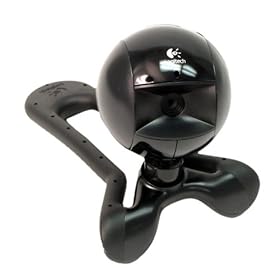
Logitech Quickcam Communicate STX - First Impressions
Just picked up a few of these to do some video conference testing. They were on sale for $29 at Skype.com (normally $49). I have only been using it for a few days, but the video quality is good for a entry level webcam. Setup was very easy, I plugged in the camera and WindowsXP downloaded the drivers from Windows Update automatically. I started up Skype, camera was recognized and I started using it.
My only gripe so far is the "Universal Monitor Clip". It isn't a clip, just a bendable piece of plastic with indentations so it can grip onto a laptop or monitor. The problem is that it doesn't bend or grip well enough. I have had some trouble getting the camera to balance & aim properly on my Laptop (Dell D620) without having to adjust my screen angle.

Specs:
- True VGA (640 x 480) resolution
- Still image capture: 1.3 million pixels (with software enhancement)
- Video capture: Up to 640 x 480 pixels
- Frame rate: Up to 30 frames per second
- Field of view: 42º horizontal
- USB 2.0 certified
- Optics: Fixed focus
Link:
http://www.logitech.com/index.cfm/webcam_communications/webcams/devices/352&cl=roeu,en
My only gripe so far is the "Universal Monitor Clip". It isn't a clip, just a bendable piece of plastic with indentations so it can grip onto a laptop or monitor. The problem is that it doesn't bend or grip well enough. I have had some trouble getting the camera to balance & aim properly on my Laptop (Dell D620) without having to adjust my screen angle.
Specs:
- True VGA (640 x 480) resolution
- Still image capture: 1.3 million pixels (with software enhancement)
- Video capture: Up to 640 x 480 pixels
- Frame rate: Up to 30 frames per second
- Field of view: 42º horizontal
- USB 2.0 certified
- Optics: Fixed focus
Link:
http://www.logitech.com/index.cfm/webcam_communications/webcams/devices/352&cl=roeu,en
Thursday, October 11, 2007
AutoIT Timer/Countdown
I have started using AutoIT v3 to write automated installers and other scripted windows programming lately. When I send out an update to a client computer, sometimes I want to be able to notify the user and let them delay the update for a set amount of time. Using the TimerInit() & TimerDiff() functions I am able to pop up a message and begin a timer.

#include <GUIConstants.au3>
;
;milliseconds for timer, start the timer and label text
;
$ms = 3601000
$timer = TimerInit()
$labeltext = "The IT department needs to install the latest approved updates..."
;
;gui window with text, Install Now button and timer window
;
GUICreate("Software Update", 350, 330, -1, -1, $WS_DLGFRAME, $WS_EX_TOPMOST)
$Install = GUICtrlCreateButton ("Install Now", 100, 250, 150, 50)
$Label = GUICtrlCreateLabel($labeltext, 10, 10, 330, 200)
$Input = GUICtrlCreateInput("", 140, 225, 75, 20, BitOr($SS_CENTER, $ES_READONLY))
GUISetState (@SW_SHOW)
;
;wait for timer to expire or for Install Now button to be clicked
;each time around the loop, it will update the timer displayed on the screen
;
While (TimerDiff($timer) < $ms) and (GUIGetMsg() <> $Install)
;
$seconds = TimerDiff($timer)/1000
$diff = $seconds - ($ms/1000)
;
$minutes = Int($diff / 60)
$secondsRem = $diff - ($minutes * 60)
;
$minutes = $minutes * -1
$secondsRem = $secondsRem * -1
$time = StringFormat("%02d", $minutes) & ":" & StringFormat("%02d", $secondsRem)
;
GUICtrlSetData($Input, $time)
;
WEnd
;
Run("yourcommand.exe")

Subscribe to:
Posts (Atom)